Blog

  • SEO Mastery: Outsmarting Your Competitors with Proven Strategies for Success

    SEO Mastery: Outsmarting Your Competitors with Proven Strategies for Success

    In the fiercely competitive landscape of online business, staying ahead of the game is crucial. One of the most effective strategies for optimizing your website’s visibility is understanding the keywords your competitors are using. Unraveling the mystery behind your competitor’s keyword strategy can provide invaluable insights, helping you refine your own SEO approach. In this comprehensive guide, we will delve into the various methods and tools available to uncover the keywords that are propelling your competitors to the top of search engine rankings.

    Understanding the Importance of Competitor Keyword Analysis

    Keywords are the building blocks of effective search engine optimization (SEO). Identifying the keywords your competitors are targeting can offer several advantages:

    1. Strategic Planning: Knowing your competitor’s keywords allows you to align your content strategy with theirs, ensuring you are targeting the same audience.

    2. Content Optimization: By understanding which keywords your competitors are ranking for, you can optimize your content to compete for the same search terms.

    3. Identifying Gaps: Analyzing your competitor’s keywords may reveal opportunities they have overlooked. This enables you to fill the gaps and target a broader range of relevant keywords.

    4. Staying Competitive: In the dynamic world of SEO, staying competitive requires continuous adaptation. Monitoring your competitor’s keyword strategy helps you stay abreast of industry trends and shifts in user behavior.

    Now, let’s explore the methods and tools you can use to uncover the keywords your competitors are leveraging.

    1. Manual Analysis of Competitor Websites

    Start by conducting a thorough manual analysis of your competitor’s website. Look for the following elements:

    – Meta Tags: Examine their meta titles and descriptions. These tags often provide a glimpse into the primary keywords they are targeting.

    – Header Tags: Analyze the header tags (H1, H2, H3, etc.) in their content. These tags are indicative of the hierarchy and importance of keywords within the content.

    – Content Body: Scrutinize the actual content on their pages. Identify the frequency and placement of keywords within the text.

    – URL Structure: Evaluate the structure of their URLs. Keywords in URLs can contribute to better search engine rankings.

    2. Utilize Browser Extensions

    Several browser extensions can simplify the process of analyzing competitor websites. Extensions like MozBar, Ahrefs, and SimilarWeb can provide quick insights into a website’s keywords, backlinks, and overall SEO performance.

    3. Competitor Analysis Tools

    Take advantage of specialized competitor analysis tools designed to unveil detailed insights into your competitor’s keyword strategy. Some popular tools include:

    SEMrush: This versatile tool not only identifies the keywords your competitors are ranking for but also provides data on their organic search positions, traffic, and more.

    Ahrefs: Known for its robust backlink analysis, Ahrefs also offers comprehensive keyword insights, including the ability to see which keywords are driving traffic to a competitor’s site.

    – SpyFu: SpyFu is designed specifically for competitor analysis. It allows you to see the keywords your competitors have bought on Google Ads, as well as their organic search rankings.

    4. Google Search Console

    If you have access to your competitor’s website data through Google Search Console, you can gain valuable insights into the keywords driving traffic to their site. While this method may not provide a comprehensive list, it can offer a glimpse into the most significant keywords.

    5. Social Media Analysis

    Keywords play a role not only in search engine rankings but also in social media visibility. Analyze your competitor’s social media profiles to identify the keywords they are emphasizing in their posts, bios, and hashtags.

    6. Customer Reviews and Feedback

    Explore customer reviews and feedback for your competitors’ products or services. Customers often use specific language and keywords when expressing their experiences. This can offer valuable insights into the keywords associated with your competitor’s brand.

    7. Google Trends

    Google Trends is an excellent tool for understanding the popularity of specific keywords over time. Compare the trends for keywords relevant to your industry and identify those on the rise. This can help you anticipate shifts in user behavior and adjust your keyword strategy accordingly.

    In the dynamic world of SEO, staying ahead of the competition requires continuous adaptation and strategic planning. Uncovering the keywords your competitors are using is a crucial step in refining your own SEO strategy. By combining manual analysis, browser extensions, specialized tools, and insights from social media and customer reviews, you can build a comprehensive understanding of your competitor’s keyword landscape.

    Remember that SEO is an ongoing process, and regular monitoring of your competitor’s keyword strategy is essential. As you integrate these insights into your own strategy, you’ll be better equipped to optimize your content, improve your search engine rankings, and ultimately outperform your competitors in the online arena. Stay vigilant, stay adaptive, and let the power of competitor keyword analysis propel your online presence to new heights.

    How to see what keywords your competitors are using Google Ads?

    Spying on your competitors’ Google Ads keywords can provide valuable insights into their advertising strategy, allowing you to refine your own approach. Here are several methods you can use to see what keywords your competitors are using in Google Ads:

    How to see what keywords your competitors are using Google Ads

    1. Google Ads Preview Tool:

     – Use Google’s Ad Preview and Diagnosis tool. This tool allows you to see the actual ads that are running for a specific keyword without affecting the performance of the ads. However, keep in mind that it won’t provide a comprehensive list of all keywords; rather, it gives you a glimpse of the current ads.

    2. Manual Google Searches:

    – Conduct manual searches on Google using relevant keywords related to your industry. Analyze the keywords used in these ads to get an idea of what your competitors are targeting.

    3. Google Ads Auction Insights:

    – If you’re already running Google Ads campaigns, you can use the Auction Insights report to see how your performance compares to your competitors. While this won’t show you the specific keywords, it provides information on impression share, average position, and overlap rate with other advertisers. It can give you an indication of who your main competitors are in the ad space.

    4. SEMrush:

    – SEMrush is a comprehensive SEO and PPC tool that allows you to analyze your competitors’ Google Ads strategy. Enter your competitor’s domain into SEMrush, and it will provide information on the keywords they are bidding on, the ad copy they are using, and even estimates of their monthly ad spend.

    5. SpyFu:

    – SpyFu is a dedicated competitor analysis tool for both SEO and PPC. With SpyFu, you can enter a competitor’s domain and see a list of all the keywords they have purchased on Google Ads, including the ad copies and the historical data. It’s a powerful tool for gaining insights into your competitors’ advertising strategies.

    6. AdWords Ad Preview and Diagnosis Tool:

    – This tool is available within the Google Ads platform. Enter a specific keyword, and it will show you the live ads that are currently running for that keyword. While it doesn’t provide a comprehensive list, it can give you a snapshot of the current advertising landscape for a particular keyword.

    7. Keyword Spy Tools:

    – There are various keyword spy tools available that focus on PPC advertising. Tools like iSpionage and AdPlexity allow you to enter a competitor’s domain and see the keywords they are targeting in their PPC campaigns. These tools often provide additional data such as ad copies, landing pages, and performance metrics.

    8. Google Ads Keyword Planner:

    – While primarily a tool for planning your own campaigns, the Google Ads Keyword Planner can also offer insights into what keywords might be relevant to your competitors. Enter their landing page or product/service offerings to get keyword suggestions.

    Remember, combining multiple methods and tools will give you a more comprehensive view of your competitors’ Google Ads strategy. Keep in mind that the effectiveness of these methods may vary, and it’s essential to stay ethical and within the bounds of applicable laws and regulations while conducting competitor analysis.

    How do you determine keyword competition?

    Determining keyword competition is a critical aspect of keyword research in the field of search engine optimization (SEO). The level of competition associated with a keyword can influence your ability to rank for it and the resources you need to allocate to succeed. Here are several methods to help you assess keyword competition:

    1. Google Keyword Planner:

    – Google Keyword Planner is a tool within Google Ads that provides insights into the average monthly searches for a keyword and its level of competition. It assigns a competition level ranging from low to high. While this metric is based on paid advertising competition, it can still give you a general idea of keyword competitiveness.

    2. SERP Analysis:

    – Conduct a manual analysis of the Search Engine Results Pages (SERPs) for your target keyword. Look at the websites that currently rank highly. If you see authoritative and well-established sites, it indicates higher competition. Assess the quality and relevance of the content on these pages.

    3. Backlink Analysis:

    – Use backlink analysis tools like Ahrefs or Moz to evaluate the backlink profiles of the top-ranking pages for a keyword. Higher competition keywords often have more backlinks, and sites with strong backlink profiles are generally harder to outrank.

    4. Domain Authority and Page Authority:

     – Check the Domain Authority (DA) and Page Authority (PA) of the websites that are ranking for your target keyword. Tools like Moz or Ahrefs can provide this information. If the top-ranking sites have high DA and PA, it signifies a more competitive landscape.

    5. Number of Competing Pages:

    – Use search engines to check the number of pages that directly compete for your chosen keyword. A simple way to do this is by putting the keyword in quotes in the search bar (e.g., “keyword”). The number of results will give you an idea of the competition.

    6. Long-Tail vs. Short-Tail Keywords:

    – Long-tail keywords (more specific, longer phrases) often have lower competition than short-tail keywords. Focusing on a combination of both can be a strategic approach, especially if you’re targeting a niche audience.

    7. Google Trends:

    – Google Trends can provide insights into the popularity of a keyword over time. A declining trend may indicate reduced competition, while a consistent or increasing trend could signal higher competition.

    8. Keyword Difficulty Tools:

    – Several tools specifically calculate keyword difficulty. SEMrush, Ahrefs, Moz, and other SEO tools offer a keyword difficulty metric that estimates how hard it is to rank for a particular keyword based on various factors.

    9. Competitor Analysis:

    – Analyze the keywords your targeting competitors are. If they are consistently ranking for high-competition keywords, it may indicate that those keywords are challenging to rank for.

    10. User Intent:

    – Consider the intent behind the keyword. Some keywords may have high competition because they represent broad topics with a lot of potential traffic. Others may be more specific and have lower competition but still attract highly targeted audiences.

    11. Local vs. Global Competition:

    – The level of competition can vary based on whether you’re targeting a local or global audience. Localized keywords may have lower competition, especially if you’re operating in a niche market.

    12. Seasonal Trends:

    – Take into account any seasonal fluctuations in keyword competition. Some keywords may become more competitive during specific times of the year.

    13. Google Ads CPC (Cost Per Click):

    – High CPC in Google Ads for a specific keyword often indicates strong competition. Advertisers are willing to pay more for keywords that are more challenging to rank for organically.

    By combining these methods, you can develop a comprehensive understanding of the competition associated with your target keywords. Keep in mind that keyword competition is dynamic, and regular monitoring is essential for adapting your strategy over time.

    How do I beat my competitors in SEO?

    Beating your competitors in SEO requires a strategic and multifaceted approach. It involves optimizing your website, content, and overall online presence to not only match but exceed the standards set by your competitors. Here’s a step-by-step guide on how to gain a competitive edge in SEO:

    1. Conduct Thorough Keyword Research:

    – Identify and target relevant keywords that align with your business goals. Focus on long-tail keywords and short-tail mix. Use tools like SEMrush,Google Keyword Planner, Ahrefs etc for comprehensive good keyword research.

    2. Understand Your Competitors:

    – SEO strategies analyze for your competitors.Identify the keywords they are targeting, the content they are creating, and their backlink profiles. Tools like Ahrefs, SEMrush and SpyFu can provide valuable insights.

    3. Create High-Quality, Relevant Content:

    – Develop content that is not only informative but also engages your audience. Aim to create content that is more valuable and comprehensive than what your competitors are offering. This could include in-depth guides, case studies, infographics, and multimedia content.

    4. Optimize On-Page SEO:

    – Ensure that every page on your website is optimized for the search engines.Elevate your online presence by fine-tuning meta titles, meta descriptions, header tags, and image alt tags. Ensure these elements are finely optimized to not only capture attention but also enhance search engine visibility, fostering a holistic and impactful digital footprint. Pay attention to keyword placement and ensure a natural and user-friendly flow.

    5. Improve Website Loading Speed:

    – Google considers page speed as a ranking factor. Optimize your website’s loading speed by compressing images, using browser caching, and minimizing HTTP requests. Google’s PageSpeed Insights can provide recommendations for improvement.

    6. Mobile Optimization:

    – Ensure your website is mobile-friendly. Google uses mobile-first indexing, so a mobile-friendly site is crucial for SEO success.

    7. Build Quality Backlinks:

    – Develop a strong backlink profile by earning high-quality, authoritative links. Focus on natural link-building strategies, such as creating shareable content, reaching out to influencers, and building relationships within your industry.

    8. Utilize Local SEO:

    – Optimize local search If your business has a local presence. Seize control of your online presence by claiming and optimizing your Google My Business listing. Cultivate customer engagement through encouraging reviews, and meticulously maintain consistency in your NAP (Name, Address, Phone number) information across various online directories. This trifecta of actions fortifies your digital identity, bolstering trust and discoverability in the online landscape.

    9. Regularly Update Content:

    – Keep your website’s content up-to-date. Google tends to favor fresh and relevant content. Regularly update blog posts, refresh outdated information, and add new content to keep your site dynamic.

    10. Optimize for Voice Search:

    – Embrace the era of voice-activated devices by tailoring your content for seamless voice search experiences. Infuse your messaging with the art of conversation and natural language, harmonizing with the way individuals engage in voice searches.

    11. Monitor and Analyze Performance:

    – Consistently gauge your website’s efficacy with the precision of tools like Google Analytics and Google Search Console. Keep a vigilant eye on pivotal indicators like organic traffic, keyword standings, and user interactions. Harness this wealth of data to craft judicious decisions and fine-tune your strategy for optimal performance.

    12. Adapt to Algorithm Changes:

    – Keep your finger on the pulse of search engine dynamics by staying abreast of algorithm updates. Remain vigilant and adaptable to evolving search landscapes, ensuring your strategies align with the latest algorithmic shifts for sustained online visibility.

    13. Invest in Technical SEO:

    – Address technical aspects of SEO, including crawl errors, XML sitemaps, and robots.txt. Ensure your website is easily crawlable by search engines, and fix any technical issues promptly.

    14. Social Media Presence:

       – While social media signals may not directly impact rankings, a strong social media presence can contribute to brand visibility and traffic. Share your content on social platforms and engage with your audience.

    Remember, SEO is a long-term strategy, and results may take time. Consistency, adaptability, and a commitment to delivering value to your audience are key to surpassing your competitors in the ever-evolving landscape of search engine optimization.

    If you want to get your compititor analysis report for free contact with us
  • Custom PHP app development – Elevate Your Online Presence.

    Custom PHP app development – Elevate Your Online Presence.

    In the dynamic landscape of the digital era, businesses are constantly seeking innovative ways to establish a robust online presence and deliver seamless user experiences. Custom PHP website development and custom PHP app development have emerged as powerful tools in this quest, enabling businesses to create tailored solutions that cater to their unique needs. This article delves into the world of custom PHP development, exploring its benefits, applications, and the crucial role it plays in shaping the future of digital experiences.

    Understanding Custom PHP Development:

    Custom PHP development refers to the creation of websites and applications using the PHP programming language with a personalized approach. Unlike off-the-shelf solutions, custom PHP development allows businesses to build platforms tailored to their specific requirements. This bespoke approach ensures a higher level of flexibility, scalability, and efficiency in meeting the distinct goals and objectives of the organization.

    Benefits of Custom PHP App Development:

    1. Tailored Solutions for Unique Business Needs:

    Custom PHP website development empowers businesses to address their specific requirements, whether it involves intricate functionalities, unique design elements, or seamless integration with existing systems. This tailored approach ensures that the final product aligns perfectly with the business’s goals.

    2. Scalability for Future Growth:

    One of the significant advantages of custom PHP development is its scalability. Businesses evolve over time, and a custom PHP website or app can easily adapt to changing needs, ensuring that the digital presence grows seamlessly alongside the business.

    3. Enhanced Performance and Speed:

    Custom PHP development allows for optimized coding, resulting in websites and applications that perform faster and more efficiently. This is crucial in today’s fast-paced digital landscape, where users expect instant responses and smooth interactions.

    4. Security at the Core:

    Security is a top priority in the digital realm, and custom PHP development offers the advantage of incorporating robust security measures. With tailor-made solutions, businesses can implement encryption, authentication, and other security features specific to their needs, safeguarding sensitive data.

    5. Cost-Effective in the Long Run:

    While the initial investment in custom PHP development may seem higher than using pre-built solutions, the long-term cost-effectiveness cannot be overstated. Custom solutions eliminate the need for unnecessary features and licensing fees, ensuring that businesses only pay for what they truly need.

    Cost Effective in the Long Run

    Applications of custom PHP app development:

    1. E-Commerce Solutions:

    Custom PHP development is widely used in creating e-commerce platforms tailored to the unique needs of businesses. From personalized shopping carts to secure payment gateways, custom PHP empowers online retailers to provide a seamless and enjoyable shopping experience for their customers.

    2. Content Management Systems (CMS):

    Content is king, and businesses often require dynamic and feature-rich CMS platforms. Custom PHP development allows for the creation of bespoke CMS solutions that enable businesses to manage and update their content effortlessly.

    3. Enterprise Resource Planning (ERP) Systems:

    Large enterprises with complex operations often rely on custom PHP development to build ERP systems that integrate various processes into a centralized platform. This ensures efficient resource management, streamlined workflows, and improved decision-making.

    4. Customer Relationship Management (CRM) Systems:

    Custom PHP development is instrumental in crafting CRM systems that cater to the unique needs of businesses in managing customer interactions, tracking leads, and improving overall customer satisfaction.

    5. Social Networking Platforms:

    Social media plays a crucial role in today’s interconnected world. Custom PHP development is commonly used to create social networking platforms with features specific to the targeted user base, fostering engagement and community building.

    The Role of Custom PHP App Development:

    As the usage of mobile devices continues to rise, custom PHP app development has become a pivotal aspect of digital strategy. Businesses are increasingly recognizing the need for mobile applications to connect with their audience on a more personal level. Custom PHP app development offers several advantages in this context.

    Custom PHP App Development

    1. Cross-Platform Compatibility:

    Custom PHP app development allows businesses to create applications that are compatible with multiple platforms, including iOS and Android. This ensures a broader reach and accessibility for the target audience.

    2. Optimized Performance:

    Custom PHP app development enables developers to optimize the app’s performance for specific devices and operating systems. This results in faster load times, smoother navigation, and an overall enhanced user experience.

    3. Integration with Web Services with custom php app development:

    Businesses often require seamless integration between their web and mobile platforms. Custom PHP app development facilitates this integration, ensuring consistency in data and user experience across different channels.

    4. Offline Functionality:

    Custom PHP apps can be designed to include offline functionality, allowing users to access certain features even when not connected to the internet. This is particularly valuable in scenarios where a stable internet connection is not guaranteed.

    5. Tailored User Interfaces:

    Every business has its unique branding and design preferences. Custom PHP app development allows businesses to create mobile applications with user interfaces that align with their brand identity, fostering brand recognition and loyalty.

    The Collaborative Approach in Custom PHP Development:

    Successful custom PHP development requires a collaborative approach involving various stakeholders, including business owners, developers, designers, and end-users. Here’s how each party contributes to the process:

    1. Understanding Business Requirements:

    Business owners play a crucial role in the initial stages by articulating their specific requirements, goals, and expectations. This information guides developers in crafting a solution that precisely aligns with the business’s vision.

    2. Designing User-Centric Interfaces:

    Designers come into play in creating user interfaces that are not only visually appealing but also intuitive and user-friendly. A seamless user experience is critical for the success of any custom PHP website or app.

    3. Efficient Development Process:

    Developers leverage their technical expertise to bring the envisioned solution to life. The use of PHP, being a server-side scripting language, allows for the creation of dynamic and interactive web pages, ensuring a robust foundation for the digital platform.

    4. Regular Testing and Quality Assurance:

    Quality assurance teams play a vital role in the development process by conducting rigorous testing to identify and rectify any bugs or issues. This iterative testing ensures that the final product is robust, secure, and performs optimally.

    5. User Feedback and Iterative Improvements:

    End-users are essential contributors to the success of custom PHP development. Collecting feedback from users and incorporating iterative improvements based on their experiences ensures that the website or app remains relevant and aligned with evolving user expectations.

    Case Studies: Realizing the Impact of Custom PHP Development

    1. XYZ E-Commerce:

    XYZ, a growing e-commerce brand, opted for custom PHP website development to create a platform that caters specifically to its niche market. The website features a personalized shopping experience, dynamic product recommendations, and a secure payment gateway tailored to the preferences of XYZ’s customers. The result is a highly responsive and user-friendly e-commerce platform that has significantly increased sales and customer satisfaction.

    2. ABC Mobile App:

    ABC, a service-oriented business, recognized the need for a mobile application to connect with its on-the-go customers. Custom PHP app development allowed ABC to create a cross-platform app that integrates seamlessly with its existing web services. The app’s offline functionality ensures that users can access essential features even when connectivity is limited, enhancing overall customer engagement.

    Challenges and Considerations in custom PHP app development:

    While custom PHP development offers numerous advantages, it’s essential to be aware of potential challenges and considerations:

    1. Custom PHP app development Time:

    Creating a custom PHP website or app takes time, especially when compared to using pre-built solutions. However, the investment in time pays off in the form of a tailored solution that meets the unique needs of the business.

    2. Cost Implications:

    Custom PHP development may require a higher initial investment compared to off-the-shelf solutions. Businesses need to carefully evaluate their budget and weigh the long-term benefits of a custom solution against the immediate cost considerations.

    3. Skill Requirements:

    Effective custom PHP development requires skilled professionals with expertise in PHP programming and related technologies. Businesses may need to invest in training or hire experienced developers to ensure the success of their custom development projects.

    4. Maintenance and Updates:

    Custom PHP websites and apps require ongoing maintenance and updates to address security vulnerabilities, add new features, and ensure compatibility with evolving technologies. Businesses need to plan for the long-term maintenance of their custom solutions.

    Custom PHP website development and custom PHP app development have become indispensable tools for businesses seeking to establish a unique and impactful online presence. The ability to tailor digital solutions to specific business needs, coupled with the flexibility and scalability offered by PHP, makes custom development a strategic choice in the ever-evolving digital landscape.

    As businesses continue to navigate the complexities of the digital realm, the role of custom PHP development will only become more pronounced. Whether it’s crafting personalized e-commerce experiences, building robust content management systems, or creating engaging mobile applications, businesses can harness the power of PHP to unlock limitless possibilities in delivering unparalleled digital experiences. With a collaborative approach, a keen understanding of business requirements, and a commitment to ongoing improvement, custom PHP development stands as a beacon for those aiming to carve their unique path in the digital sphere.

    Why you should choose Dropndot Solution as a custom php web development company/custom php application development company

    In the realm of bespoke digital solutions, Dropndot Solution stands out as a leading custom PHP web development company and custom PHP application development company. With a commitment to delivering tailored solutions that perfectly align with your business objectives, Dropndot Solution leverages the power of PHP to create dynamic, secure, and high-performance websites and applications.

    Why Choose Dropndot Solution for custom PHP app development?

    1. Expertise in Custom PHP Web Development:

    As a dedicated custom PHP web development company, Dropndot Solution brings a wealth of expertise to the table. The team’s proficiency in PHP programming ensures the creation of websites that are not only visually stunning but also functionally robust, meeting the unique needs of your business.

    2. Comprehensive custom PHP development services:

    Dropndot Solution excels as a custom PHP application development company, offering end-to-end services to transform your ideas into fully functional and feature-rich applications. Whether you need a cross-platform mobile app or a dynamic web application, their team has the skills to bring your vision to life.

    3. Tailored Solutions for Your Business using custom PHP app development:

    At Dropndot Solution, the emphasis is on understanding your business requirements thoroughly. The custom PHP solutions crafted by the team are tailored to fit your unique needs, ensuring that the end product aligns seamlessly with your brand identity and goals.

    4. Proven Track Record of Success:

    With a portfolio that showcases successful projects across various industries, Dropndot Solution has earned a reputation for delivering excellence. Their track record of satisfied clients attests to their commitment to quality and customer satisfaction.

    5. Innovative Approach to PHP Development:

    Dropndot Solution adopts an innovative approach to PHP development, staying abreast of the latest industry trends and technologies. This ensures that the custom PHP websites and applications they create are not only cutting-edge but also capable of adapting to the evolving digital landscape.

    6. Cross-Platform Compatibility:

    As a custom PHP application development company, Dropndot Solution understands the importance of reaching a broad audience. Their expertise in creating cross-platform applications ensures that your digital presence is accessible to users on both iOS and Android devices.

    7. Scalability for Future Growth:

    Dropndot Solution’s custom PHP solutions are designed with scalability in mind. Whether your business experiences rapid growth or evolves over time, their development approach ensures that your website or application can scale seamlessly to meet changing demands.

    8. Focus on Security and Reliability:

    Security is a top priority for Dropndot Solution. Their custom PHP web development services incorporate robust security measures, ensuring that your digital assets are protected from potential threats. The reliability of their solutions contributes to a smooth and secure user experience.

    9. Transparent and Collaborative Process:

    Dropndot Solution believes in transparency and collaboration throughout the development process. From the initial consultation to the final delivery, you are kept informed and involved, ensuring that the end product meets and exceeds your expectations.

    Choosing Dropndot Solution as your custom PHP web development company/custom PHP application development company means partnering with a team dedicated to turning your digital aspirations into reality. With a focus on innovation, security, and client satisfaction, Dropndot Solution emerges as a trusted ally in your journey toward a distinctive and impactful online presence.

    Explore the possibilities with Dropndot Solution’s custom PHP development services. Visit our service page https://www.dropndot.com/service/custom-php/ to learn more about how they can elevate your digital presence with tailored solutions crafted to perfection.

  • A Comprehensive Guide to Finding Nofollow and Dofollow Links on a Website

    A Comprehensive Guide to Finding Nofollow and Dofollow Links on a Website

    Understanding the distinction between nofollow and dofollow links is crucial for anyone involved in website management, SEO (Search Engine Optimization), or digital marketing. These link attributes play a pivotal role in determining a website’s search engine ranking and overall online visibility. In this comprehensive guide, we will delve deep into the world of nofollow and dofollow links, explaining what they are, why they matter, and how to find them on a website. By the end of this article, you’ll be well-equipped to navigate the complex landscape of website linking.

    1. What Are Nofollow and Dofollow Links?

    1.1 Nofollow Links

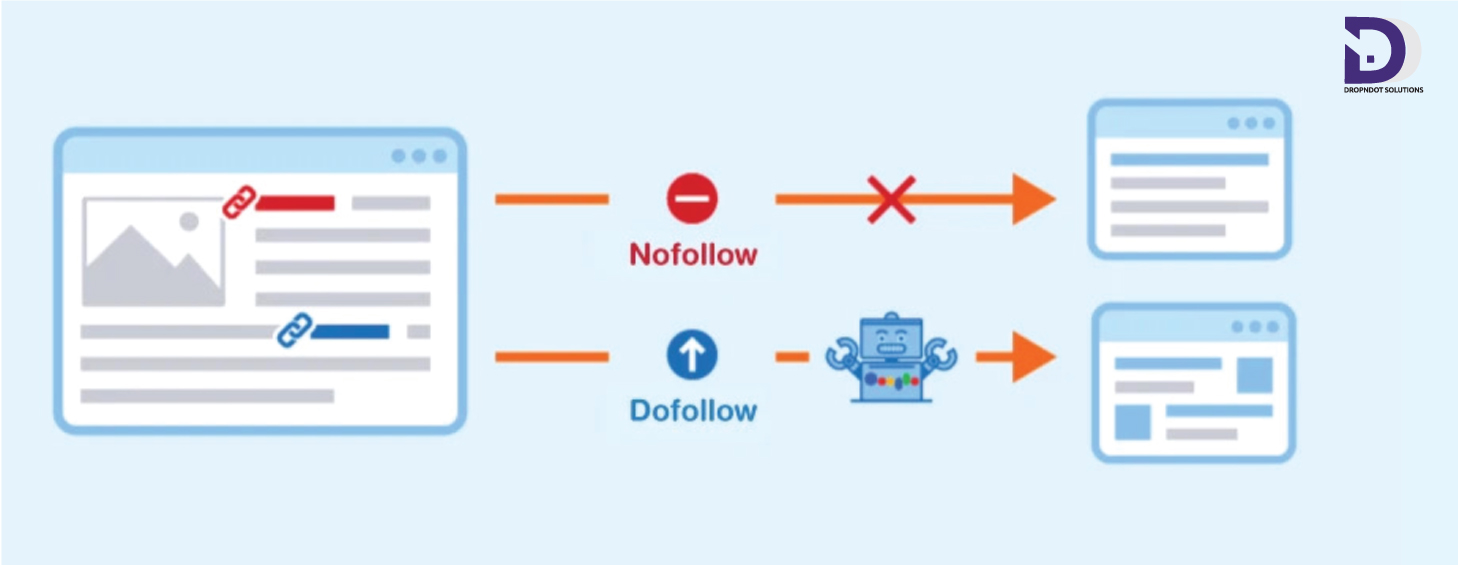
    Nofollow links are HTML attributes used to instruct search engines not to pass any link juice or “authority” from one webpage to another. These links are typically used when you don’t want to endorse the linked content or when you want to avoid potential penalties for linking to low-quality or spammy websites. The syntax for a nofollow link is:

    <a href="https://example.com" rel="nofollow">Anchor Text</a>

    1.2 Dofollow Links

    Conversely, dofollow links are standard HTML links that allow search engines to follow them and pass link authority from one page to another. By default, all links are considered dofollow unless specifically marked as nofollow. The syntax for a dofollow link is:

    <a href="https://example.com">Anchor Text</a>

    2. Why Do Nofollow and Dofollow Links Matter?

    Understanding the importance of these link attributes is essential for various reasons:

    2.1 SEO Impact

    Dofollow links are considered votes of confidence by search engines. When reputable websites link to your content with dofollow links, it can significantly boost your website’s search engine ranking.

    Conversely, nofollow links do not pass link authority. While they may still generate traffic and offer value, they do not contribute directly to SEO.

    2.2 Spam Prevention

    Nofollow links are a tool to deter spammers and prevent link manipulation. They discourage low-quality websites from benefiting from legitimate websites’ link authority.

    2.3 User Experience

    Properly labeling nofollow links can enhance the user experience by signaling which links are trustworthy and which ones might lead to unverified or potentially harmful content.

    3. How to Manually Inspect Links for Nofollow and Dofollow Attributes

    You can manually inspect links on a website by right-clicking on a link and selecting “Inspect” or “Inspect Element” from your browser’s context menu. This opens the browser’s Developer Tools, which will display the HTML source code for the selected link.

    Here’s how to identify nofollow and dofollow links manually:

    1. Right-click on the link you want to inspect and choose “Inspect” or “Inspect Element.”
    2. In the Developer Tools, locate the link in the HTML source code.
    3. Look for the rel attribute within the <a> tag. If it contains “nofollow,” the link is nofollow; if it’s absent or contains other values, it’s dofollow.
    <a href="https://example.com" rel="nofollow">Anchor Text</a>

    This method is suitable for inspecting individual links, but it can be time-consuming for larger websites.

    4. Using Browser Extensions for Link Analysis

    Browser extensions can streamline the process of identifying nofollow and dofollow links. Here are some popular browser extensions that can help:

    4.1 NoFollow

    The NoFollow browser extension highlights nofollow links on a webpage. After installation, it adds a color border around nofollow links, making them easy to spot.

    4.2 Link Checker Extensions

    Some browser extensions, like Check My Links for Google Chrome, can check all links on a webpage and highlight any broken or nofollow links. This is especially useful for link auditing.

    5. Website Crawlers and Link Checker Tools

    Website crawlers and link checker tools are efficient ways to analyze all the links on a website quickly. These tools can provide a comprehensive overview of a site’s link profile, including information about nofollow and dofollow links.

    Some popular tools include:

    5.1 Screaming Frog SEO Spider

    Screaming Frog is a powerful website crawler that can identify nofollow and dofollow links, as well as provide other valuable SEO insights. It offers both free and paid versions.

    5.2 Ahrefs

    Ahrefs is an all-in-one SEO tool that can analyze a website’s link profile, including the type of links (nofollow or dofollow), their quality, and much more. Ahrefs requires a subscription but offers a free trial.

    6. Analyzing Link Attributes in HTML Source Code

    If you need to analyze links on a specific webpage or a few pages, you can inspect the HTML source code. Here’s how to do it:

    1. Visit the webpage you want to analyze.
    2. Right-click on the page and select “View Page Source” or “Inspect.”
    3. In the HTML source code, use the “Find” or “Search” feature (usually Ctrl + F or Command + F) to search for “nofollow.” If found, it indicates a nofollow link.
    4. To find dofollow links, look for <a> tags without the “rel” attribute containing “nofollow.”

    7. SEO Audit Tools for a Comprehensive Analysis

    If you’re conducting a thorough SEO audit of your website or someone else’s, you can use SEO audit tools that provide a complete overview of the site’s link profile. These tools not only identify nofollow and dofollow links but also assess other critical SEO factors.

    Some popular SEO audit tools include:

    7.1 SEMrush

    SEMrush offers an extensive suite of SEO tools, including a site audit feature that identifies nofollow and dofollow links. It also provides insights into keywords, rankings, and more.

    7.2 Moz Pro

    Moz Pro offers link analysis tools that help you identify the types of links on your website, including nofollow and dofollow links. It also provides domain authority and other important SEO metrics.

    8. Conclusion

    In conclusion, understanding the difference between nofollow and dofollow links is essential for effective SEO and website management. While nofollow links may not directly boost your search engine ranking, they play a crucial role in maintaining a healthy link profile and preventing spam. Dofollow links, on the other hand, are the ones you want to earn from reputable sources to enhance your SEO efforts.

    To find nofollow and dofollow links on a website, you can use a variety of methods, including manual inspection, browser extensions, website crawlers, and SEO audit tools. Each method has its advantages, so choose the one that best suits your needs and the scale.

  • How to Find and Fix Internal Redirects: A Comprehensive Guide

    How to Find and Fix Internal Redirects: A Comprehensive Guide

    Internal redirects are a common but often overlooked issue on websites that can negatively impact user experience and SEO. These redirects occur when a webpage’s URL is changed, but the old URL still points to the new one. This can lead to confusion for both users and search engines, potentially causing a drop in rankings and organic traffic.

    In this comprehensive guide, we will delve into the world of internal redirects, discussing what they are, why they are problematic, and most importantly, how to find and fix them to optimize your website’s speed and increase its visibility on search engines.

    Understanding Internal Redirects

    Before we delve into the process of finding and fixing internal redirects, it’s essential to understand what they are and how they work.

    What Are Internal Redirects?

    An internal redirect, also known as a 301 or 302 redirect, is a way to send website visitors and search engines from one URL to another within the same domain. These redirects are typically used for various reasons, including:

    1. URL Structure Changes: When a website undergoes a redesign or restructuring, old URLs may be redirected to new ones to maintain continuity and avoid broken links.
    1. Content Updates: If a page’s content is updated or moved to a different location on the same website, a redirect ensures that users and search engines can find the new location.
    1. Canonicalization: Internal redirects can help resolve duplicate content issues by redirecting multiple URLs to a single canonical URL.

    Types of Internal Redirects

    There are two primary types of internal redirects:

    Types of Internal Redirects
    Types of Internal Redirects
    1. 301 Redirect: A 301 redirect is a permanent redirect, indicating that the old URL has been permanently replaced by the new one. Search engines like Google consider the new URL as the canonical version and transfer the SEO value of the old URL to the new one.
    1. 302 Redirect: A 302 redirect is a temporary redirect, indicating that the change is temporary, and the old URL should still be considered valid. It does not transfer the SEO value to the new URL.

    Why Internal Redirects Are Problematic

    While internal redirects serve a purpose, they can become problematic for several reasons:

    1. User Experience: When users encounter redirects, it can lead to a slower and less smooth browsing experience. Multiple redirects can confuse visitors, making them abandon the site.
    1. SEO Impact: Internal redirects can dilute the SEO value of a page. If multiple redirects point to a single URL, search engines may not understand the correct canonical version, affecting rankings.
    1. Crawl Allocation: Search engines allocate a finite amount of resources for website crawling. If a site has too many internal redirects, it can waste the crawl budget, preventing the indexing of important pages.
    1. Indexing Issues: Search engines might not index the redirected URLs correctly, leading to potential visibility issues in search results.

    How to Find Internal Redirects

    Now that we understand the significance of internal redirects, let’s explore how to identify them on your website.

    1. Crawl Your Website

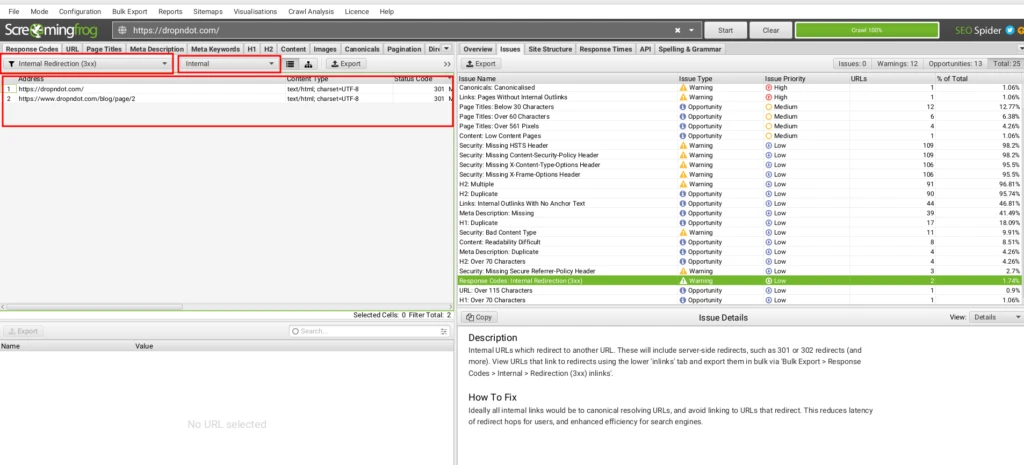
    One of the most effective ways to find internal redirects is to crawl your website using a web crawling tool like Screaming Frog or Ahrefs. These tools will provide you with a comprehensive list of URLs on your website, along with their HTTP status codes.

    Crawl Your Website
    Crawl Your Website

    Look for URLs with status codes like 301 (permanent redirect) and 302 (temporary redirect). These are the pages that have internal redirects.

    2. Check Google Search Console

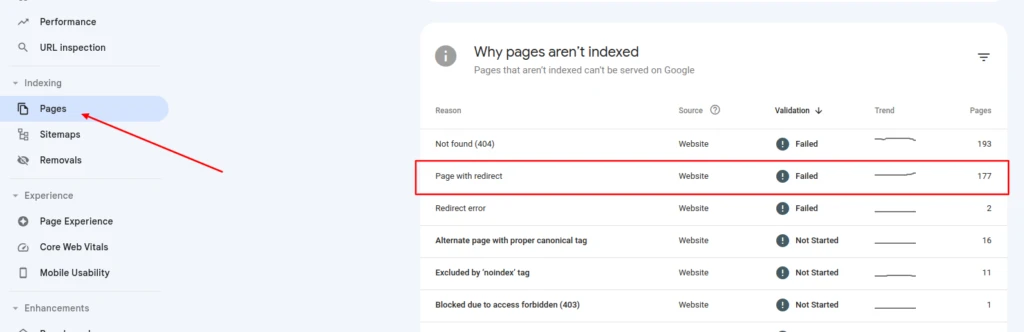
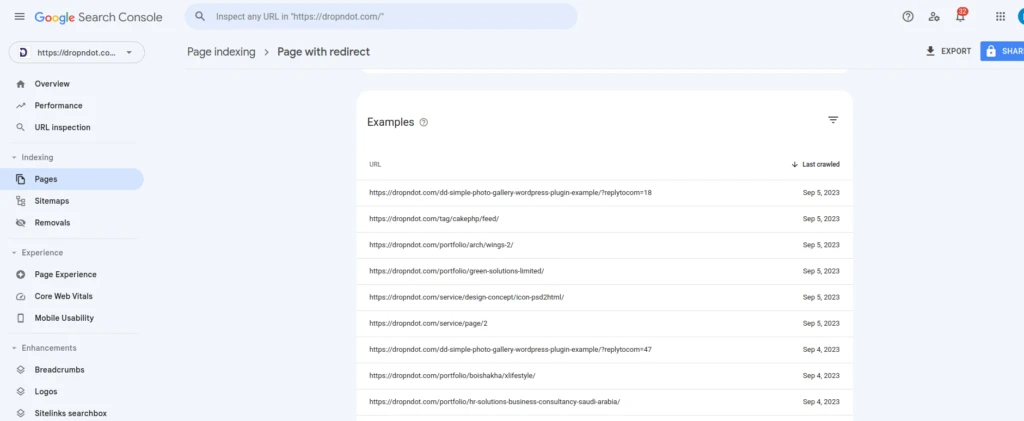
    Google Search Console is a real treasure for website owners. It can provide insights into how Googlebot crawls your site. Check the ‘Coverage’ report in Google Search Console for any issues related to redirects.

    Check Google Search Console1
    Check Google Search Console1
    Check Google Search Console2
    Check Google Search Console2

    3. Manually Inspect Links

    You can also manually inspect links on your website to identify internal redirects. Open your website in a browser and use browser developer tools to view network requests and see if any URLs result in redirects.

    4. Analyze Server Logs

    If you have access to your server logs, you can analyze them to find internal redirects. Look for entries that indicate URLs being redirected with status codes like 301 or 302.

    5. Use SEO Auditing Tools

    SEO auditing tools like Moz, SEMrush, and Ahrefs offer features to identify internal redirects as part of their site audit capabilities. By automating the process, these tools help you save valuable time.

    How to Fix Internal Redirects

    Once you’ve identified internal redirects on your website, it’s crucial to fix them to improve user experience and maintain SEO integrity. Here’s a step-by-step guide on how to fix internal redirects:

    1. Update Links and References

    If you find internal redirects caused by outdated links or references within your content, update them to point directly to the correct URLs. This will eliminate the need for redirects and improve user experience.

    2. Implement 301 Redirects

    For URLs that have permanently moved or changed, implement 301 redirects. This tells search engines that the old URL has been permanently replaced by the new one. You can usually set up 301 redirects in your website’s .htaccess file or through your content management system (CMS).

    3. Remove Unnecessary Redirects

    Review your website’s redirects and eliminate any that are unnecessary. Redirect chains, where one URL redirects to another and then to another, should be avoided as they can slow down page loading times and confuse search engines.

    4. Monitor for Broken Links

    Regularly monitor your website for broken links using tools like Broken Link Check or Screaming Frog. Fix broken links promptly to prevent the need for redirects in the first place.

    5. Update Sitemap and Robots.txt

    Ensure that your website’s sitemap and robots.txt files are up-to-date and do not include URLs that have been redirected. This helps search engines crawl and index your site correctly.

    Update Sitemap and Robots.txt
    Update Sitemap and Robots.txt

    6. Test Redirects

    After implementing or removing redirects, thoroughly test them to ensure they work as intended. Use online tools like Redirect Checker to confirm that the old URLs are correctly redirecting to the new ones.

    7. Monitor Performance

    Keep an eye on your website’s performance and SEO rankings after making changes to redirects. This will help you assess the impact of your fixes and make adjustments if necessary.

    Preventing Internal Redirect Issues

    While it’s essential to know how to find and fix internal redirects, preventing them in the first place is even better. Consider these precautionary steps:

    1. Plan Website Changes Carefully

    Before making significant changes to your website’s structure or content, plan carefully. Consider the impact on existing URLs and how you can minimize the need for redirects.

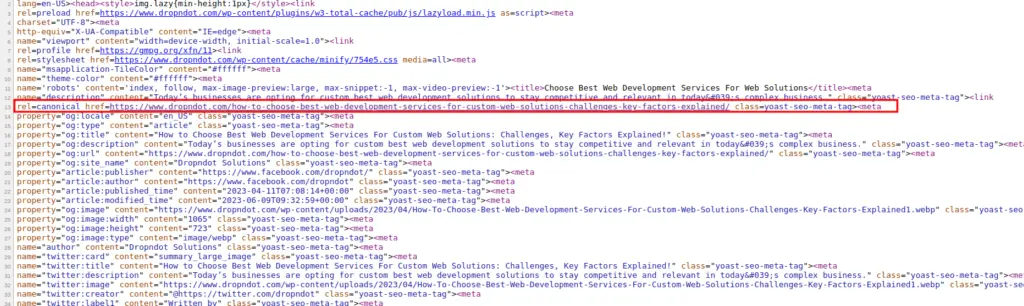
    2. Use Canonical Tags

    Implement canonical tags on pages with similar or duplicate content to guide search engines to the preferred URL. This can help prevent indexing issues caused by internal redirects.

    Use Canonical Tags
    Use Canonical Tags

    3. Keep URLs Consistent

    Maintain consistency in your URL structure. Avoid frequently changing URLs or restructuring your site, as this can lead to a higher likelihood of internal redirects.

    4. Regularly Audit Your Website

    Perform regular website audits to catch internal redirect issues early. Use the tools mentioned earlier to identify and fix problems before they become more significant.

    Internal redirection can have a significant impact on your website’s user experience and SEO performance. Understanding what they are, how to find them, and how to fix them is crucial for maintaining a healthy and well-optimized website.

    By regularly auditing your site, monitoring for issues, and taking proactive

    Supercharge Your SEO with Our Services!

    Struggling with internal redirects? We will cover:

    • Smooth User Experience
    • Improved SEO Rankings
    • More Organic Traffic
    • Efficient Crawl Management

    Say goodbye to redirect issues. Contact us today for a comprehensive SEO audit and optimization.

    Contact Us to Get Started with us!

  • How to Choose Best Web Development Services For Custom Web Solutions: Challenges, Key Factors Explained!

    How to Choose Best Web Development Services For Custom Web Solutions: Challenges, Key Factors Explained!

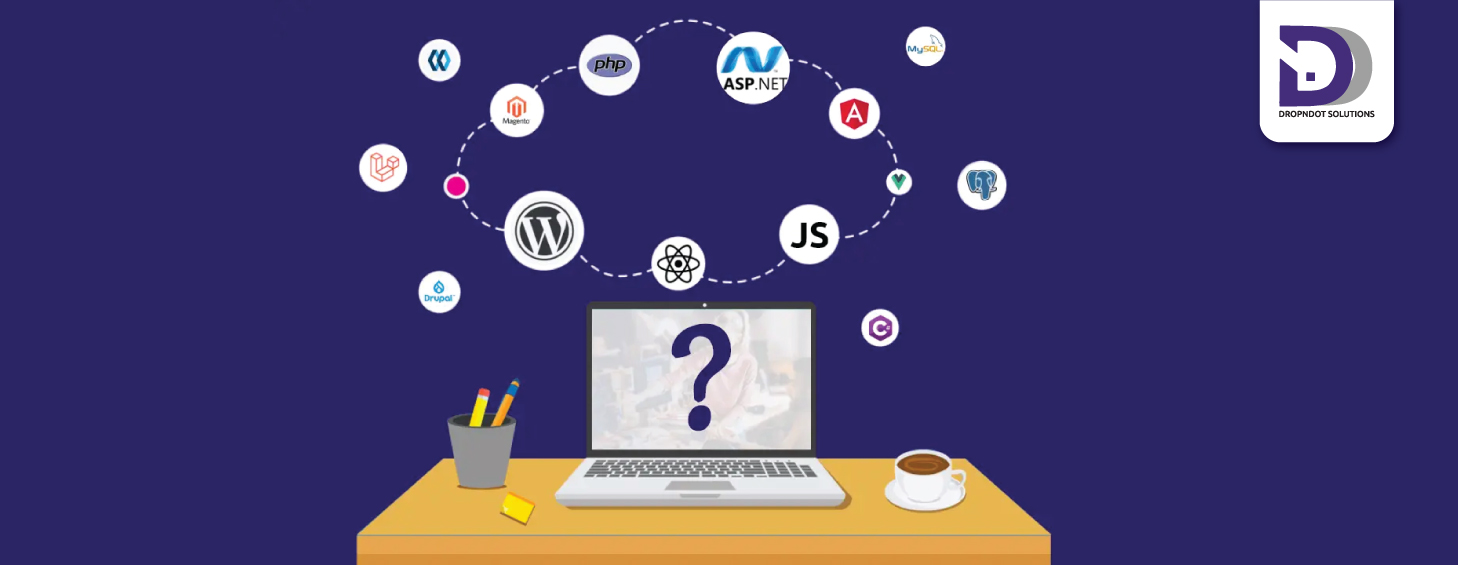
    Today’s businesses are opting for custom web solutions to stay competitive and relevant in today’s complex business ecosystem. However, creating a custom web solution requires a great deal of technical expertise, which is why choosing the best web development services among the flux of web development service providers for businesses to become successful. In this blog post, we will discuss the key challenges and factors you need to consider when choosing the best development services for custom web solutions.

    Table of Content:

    Why Do You Need Custom Web Solutions?

    Custom web solutions refer to bespoke web applications and websites that are designed and developed to meet the specific requirements of a business or organization. Unlike cookie-cutter solutions, custom web solutions are unique and built from the ground up, specifically for a particular business.

    Custom web solutions can be designed for a wide range of purposes, including e-commerce platforms, content management systems, social networking sites, and more. They are built using a range of programming languages, such as PHP, Ruby, Python, and JavaScript, and are designed to be scalable and flexible, so that they can be adapted to the changing needs of a business.

    Benefits of Custom Web Solutions

    There are several benefits of using custom web solutions for your business, including:

    Personalized Branding: Custom web solutions can be designed to match the branding of your business, ensuring a consistent look and feel across all online platforms.

    Increased Flexibility: Custom web solutions are designed to be scalable and adaptable, so that they can be modified and expanded as your business grows and changes.

    Improved Functionality: Custom web solutions are built to meet the specific requirements of a business, meaning that they can include features and functionalities that are not available in cookie-cutter solutions.

    Enhanced User Experience: Custom web solutions can be designed to provide a seamless user experience, with intuitive navigation and user-friendly interfaces.

    Competitive Advantage: Custom web solutions can provide a competitive advantage by offering unique features and functionalities that set your business apart from your competitors.

    When You Should Consider Outsourcing Your Cust Web Development Needs?

    When You Should Consider Outsourcing Your Cust Web Development Needs
    When You Should Consider Outsourcing Your Cust Web Development Needs

    To create a custom web solution for your business, you will need to work with a web development service that has the skills and expertise to design and develop a solution that meets your specific requirements. Here are some reasons why you may need to outsource your custom web solution to a best web development services:

    Lack of In-House Expertise:

    If you do not have the in-house expertise to design and develop a custom web solution, then you will need to work with a development service that has the necessary skills and experience.

    Time Constraints:

    Developing a custom web solution can be a time-consuming process, especially if you do not have the necessary resources and expertise. Working with a development service can help you to save time and ensure that your solution is delivered on schedule.

    Cost Savings:

    While custom web solutions may require a larger investment upfront, in the competitive market, outsourcing to the best web development company can often lead to cost savings in the long run by providing a more efficient and effective solution for your business.

    Access to Cutting-Edge Technology:

    Best Web development services have access to the latest technologies and tools, meaning that they can provide a custom web solution that is up-to-date and incorporates the latest trends and advancements.

    Key Challenges in Choosing the Best Web Development Services

    Ensuring Quality of Work:

    Quality is in any development project, and selecting a development service provider with a proven track record of delivering quality work should be a priority. The quality of work can be evaluated by analyzing their previous projects and client testimonials.

    Cost of Development:

    Cost is a crucial factor to consider when selecting a development service provider. While it is essential to find an affordable provider, it is also necessary to ensure that you do not compromise the quality of work to cut costs. You must strike a balance between the cost and the quality of work provided.

    Communication:

    Communication is key to the success of any web development project. You must ensure that you can communicate effectively with the development service provider to ensure that your project requirements are met. Otherwise, you may not get the desired end-product.

    Time Management: 

    Time is a critical factor in any web development project. Otherwise your web development project may not meet its goal as it should be. You must ensure that the development service provider can deliver the project within the stipulated timelines.

    Technical Expertise: 

    Technical expertise is at the core in any web development project. You must ensure that the development service provider has the necessary technical skills to complete your project successfully.

    Scalability:

    Scalability of any web development project is crucial since your business might scale in future. So it’s essential that your web app or site is scalable to meet the future needs You must ensure that the development service provider can handle your project’s growth and future changes.

    Support and Maintenance

    Support and maintenance are often discarded. But it is crucial that your web development service provider has 24/7 support and maintenance services so your web development project remains relevant years after the project is complete.

    5 Key Factors to Consider in Choosing the Best Development Services

    Choosing the right development services is a critical decision for any business. Here are 5 factors you must consider while choosing the best web development services for your project:

    Experience and Expertise

    The first and most important factor to consider in choosing a web development company is their experience and expertise. The development team should have certified developers, designers and be knowledgeable in the latest technologies and industry standards. Consider companies that has the technical skills required for your project, including programming languages, databases, frameworks, and other relevant tools.

    Proven Track Record

    Another factor to consider when choosing web development services is the company’s portfolio and case studies. A good development service should be able to provide you with a portfolio of their previous work, including case studies and track record of similar projects you are aiming. Besides, you can look for reviews and testimonials on the company’s website, social media platforms, and other review sites. 

    Development Process and Methodologies

    The development process and methodologies used by the development service are also essential. Look for a team well-defined and structured development process that includes agile methodologies. A good development process should involve regular communication with clients and have milestones and deliverables that keep the project on track.

    Proper Communication Channel

    Communication and collaboration are crucial factors in the development process. A good development team should have clear communication channels and be able to communicate and commit seamless communication throughout the development lifecycle. They should be able to collaborate effectively with the client to ensure that the project meets timelines, budgets, and resources effectively. They should be able to deliver the project on time and within the budget.

    Post-Development Support and Maintenance

    Post-development support and maintenance are crucial for the long-term success of the project. Look for development services that provide ongoing support and maintenance to ensure that the project runs smoothly after it is launched. They should be able to provide regular updates, bug fixes, and technical support.

    In conclusion, choosing the right development services can make or break a project’s success. It is essential to consider the factors outlined above to ensure that you choose the best development team for your project to develop future-proofed web solutions utilizing the latest technologies and industry standards.

    Steps to Choose the Best Web Development Services

    Step-1 Determine Your Project Needs and Objectives

    Before you begin your search for development services, you need to determine your project needs and objectives. What are you looking to accomplish with your project? What are the specific functionalities and features you require? How will the project fit into your overall business strategy? These questions are crucial and the answers will help you define your project scope and requirements.

    Step-2 Research and Shortlist Potential Development Services

    Once you have a clear understanding of your project needs and objectives, it’s time to start researching potential web development services that can meet your web development needs. There are a variety of resources you can use to find development services. As you conduct your research, make a list of potential development services that meet your requirements.

    Step-3 Evaluate and Compare Shortlisted Development Services

    After you have a list of potential development services, it’s time to evaluate and compare them. Look for key indicators of their experience, expertise, track record, communication channel and post development support etc.

    Step-4 Request for Proposal (RFP) and Contract Negotiation

    When you have figured out the best web development services, ask for a detailed proposal. The RFP should outline your project needs and requirements. After receiving the proposals, you can evaluate them based on their compliance with your requirements, pricing, and delivery timeline. Once you have selected a web development company, it’s time to negotiate the contract terms.

    Step-5 Project Kick-off and Management

    After signing the contract, it’s time to kick-off the project. The development service should provide a clear plan for project management, including timelines, milestones, and deliverables. You should also establish clear communication channels and ensure that the development service provides regular updates on the project’s progress. As the project progresses, make sure to monitor it closely to ensure that it stays on track and meets your requirements.

    Final Words

    In conclusion, choosing the best development services for your project requires a strategic approach. Dropndot has a reliable and professional team consisting of certified and seasoned web developers versed with an array of web development frameworks. Besides, Dropndot team has a proven methodologies, enriched portfolio, impeccable communication and spot-on support and maintenance support to make your dream project ideas come to life.

  • e-Commerce website development by dropndot

    e-Commerce website development by dropndot

    Recently Dropndot Limited has started a new e-Commerce website.  This will be interactive customize e-commerce site based on Woo-Commerce WP Plugins.  There will be a great change in front end to match design. So customization will be required in many places. (more…)

  • Dropndot with Responsive design and some technologies

    Dropndot with Responsive design and some technologies

    2011 was very important for dropndot limited. In this year we have achieved many success as well lose some. It was the 2nd year with DD. We have learned some technology such as how to do responsive design, shopify and start working with html5, css3 etc. We are still learning the technique of html5 in different purpose.

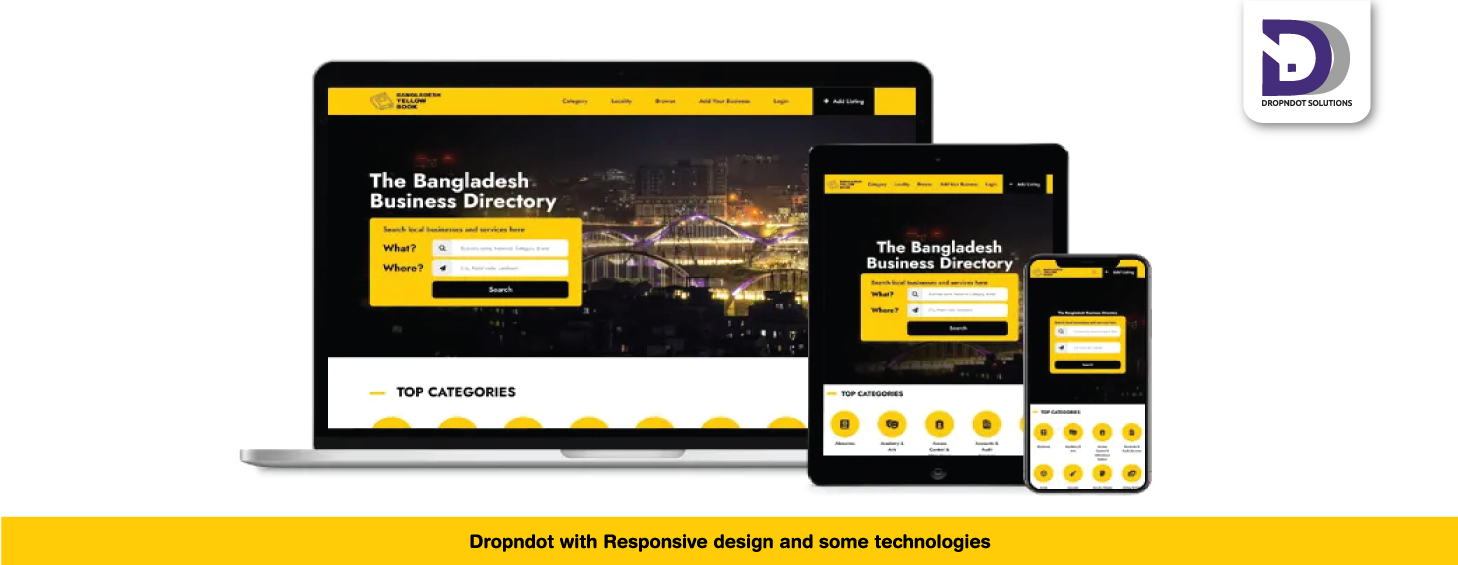
    Now most of our clients want mobile version of a website. To providing mobile version of a website, responsive design helps us lots. Using this technique we can build a website for laptop, tablet or iphone with a single css and html file. During the design we have to keep in mind it should be a responsive design.

    Another technique, we are working, is microformat and I loved the words “Designed for humans first and machines second”. A microformat is a web-based approach to semantic markup which seeks to re-use existing HTML/XHTML tags to convey metadata and other attributes in web pages and other contexts that support (X)HTML, such as RSS. This approach allows software to process information intended for end-users automatically.

  • you can say, happy birthday!

    you can say, happy birthday!

    The day was 11 June and the year was 2010… it’s a long year! The day was not a working day but a starting/entering day of dropndot office. So it is our first anniversary of dropndot and you can say, “happy birthday!”. Today It is Jun 11 2011 a working day at dropndot so we all are working silently. We are here sitting on a comfortable chair, typing on a laptop, staying in a cool room and these all are owned by dropndot. Though the day one year before, there was nothing except five hearts of confidence.

    The celebration began in our hearts and we wanted to be loud. But there is a little problem which probably will allow us to invite you here and offer you a piece of cake with a glass of drinks in delay. Don’t be disappointed, because we really owe you a treat.

    Finally it was a small but happy journey with all of our code warriors, designers and sales guys.

    The celebration began in our hearts and we wanted to be loud
  • I love pixel perfection!

    I love pixel perfection!

    At dropndot we follow 4 basic steps for a full web project development:

    1. Sales
    2. Design
    3. Markup
    4. Development

    It’s a common practice for our Markup Engineers to make the markups pixel perfect according to the design and it’s like a challenge for us to keep the design as it is for all major browsers like firefox, chrome, safari, internet explorer etc. It’s a common practice for most of the PHP Developers to finish the development with some broken markups as sometime it’s really difficult to maintain the consistency for different versions of internet explorer. But it’s me and my team who care about pixel perfections in development phase. We do some special care about markup, code commenting, database normalization, naming convention and bug testing in development phase.

    So when we live a project, you hardly get a clue to say that it’s a broken site! Or if you really find something like this, you should think that, it was the design.

    Well, we also assure you about the timeline. The process we maintain not only guarantee the quality but also stick us to the time frame. Everyone here is a performer. So they work for their own good which brings out a successful something.

    Thanks for reading.

  • Few success stories

    Few success stories

    Wow! We have completed our.Net based CMS. Now we are providing .net based solution to our clients and increased our service line. This custom CMS has same features as our PHP based custom CMS and I am sure our client will love it for it’s user friendly features. Thanks to Jitu for his excellent work.

    (more…)